Karnataka’s Special Intensive Revision (SIR), which began on June 30, requires every voter to complete a fresh verification exercise.
The SIR is carried out by the Election Commission of India (ECI) to prepare and revise electoral rolls, and ensure its accuracy. The process especially aims to remove deceased voters and duplicate names in the rolls, including those of citizens who have migrated and are registered as voters in multiple places. The election commission announced the process with the aim that ‘no eligible citizen is left out and no ineligible citizen is included in the electoral roll’.
In the Special Summary Revision (SSR) that happens every year, only voters who want to enrol, make changes or deletions need to participate. But in SIR, every voter must participate for a complete re-verification of the list.
Citizen Matters is publishing a series on the SIR in Karnataka. Here, in Part 1, we give you a step-by-step guide to the process and some Frequently Asked Questions (FAQs). In Part 2, we address top concerns and questions from citizens.
Timeline for the SIR process in Karnataka
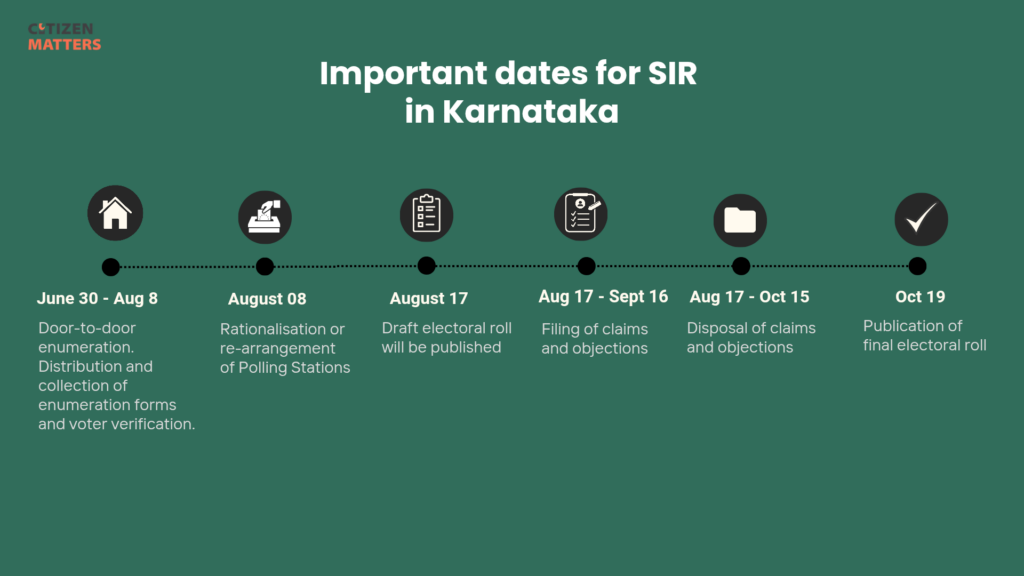
Table of contents
Filling the enumeration form: A step-by-step guide
An Enumeration Form (EF) is used to fill out the details of voters, which will be used to verify if they are eligible.
Here are the steps to submit your enumeration form:
- Your Booth Level Officer (BLO) will bring two copies of your partially filled Enumeration Form to your home.
- You can either fill the physical form, which the BLO will collect during their subsequent visit, OR
- You can fill the Enumeration Form online, by visiting the ECI page.
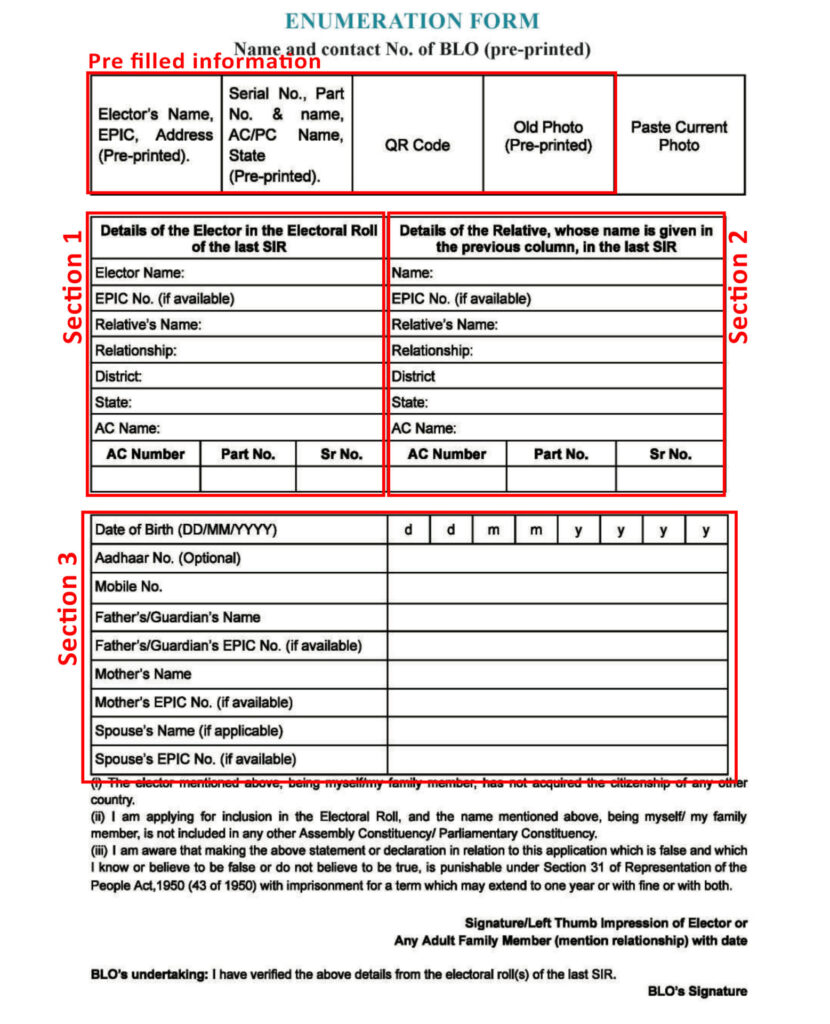
- The following details will be pre-filled in the form: elector’s name, EPIC number, address, serial number, part number, AC/PC name, old photo, and a QR code.
Details you must fill:
Section 1. Details of the voter from 2002 SIR: The steps to identify 2002 SIR details are outlined below. Use that to fill in the following information: Elector’s name, EPIC number (if available), Relative’s name and relationship, district, state, AC number, part number and serial number. This process is called self-mapping.
If you were not on the electoral roll in 2002 (below 18 or otherwise), you can skip this section and fill section 2.
Section 2. Details of Relatives from 2002 SIR: If you filled in a relative’s details in Section 1, enter only that relative’s information from the 2002 SIR. This includes their name, EPIC number (if available), relationship to you, district, state, Assembly Constituency (AC) number, part number, and serial number.
If you did not fill Section 1 because you were not on the electoral roll in 2002, provide the 2002 SIR details of one of your parents or grandparents (father, mother, grandfather, or grandmother) instead. The relative can be from any state in India.
Using a family member’s 2002 electoral record to establish your link is known as progeny mapping.
Section 3. Details of the voter: Mandatory information such as Date of birth, mobile number, father/guardian’s name, mother’s name should be filled. Enter Aadhaar number (optional), father’s and mother’s EPIC number (if available), spouse’s name (if applicable) and EPIC number (if available) should be filled in this section.
Some Frequently Asked Questions (FAQs)
- Should we attach any supporting documents while submitting the form?
You do not have to attach any documents during submission of the Enumeration Form. However, after the publication of the draft electoral roll, if the ERO or AERO doubts your eligibility and issues notice, you will have to provide supporting documents.
- What to do if I am not in the city to fill the Enumeration Form?
In that case, any adult from the family can fill your SIR details on your behalf. If the entire family is not in the city, the Enumeration Form can be filled online.
Filling the enumeration form
- How to fill the Enumeration Form online?
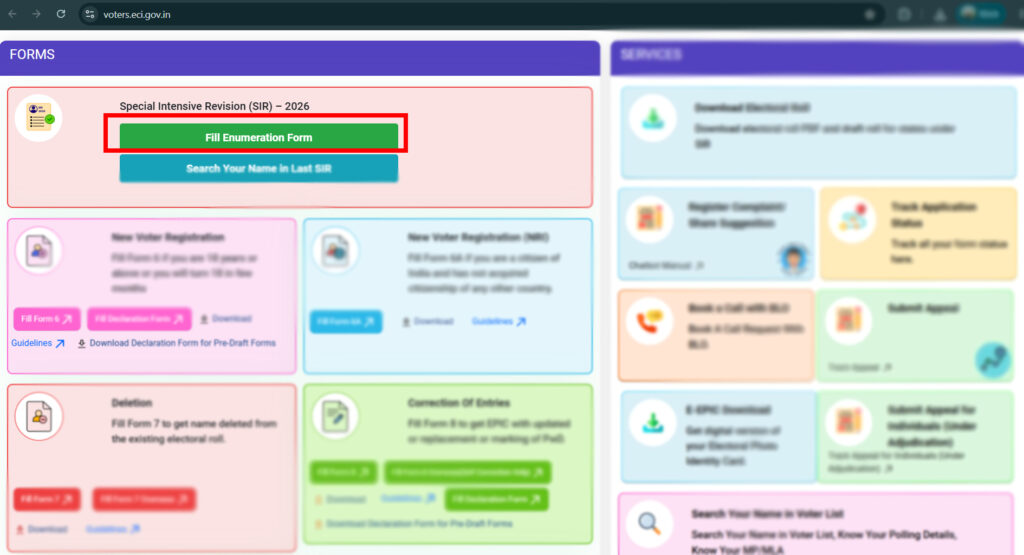
You can find the option, ‘Fill Enumeration Form’ on the ECI website. For this, your voter ID must be linked with your mobile number.
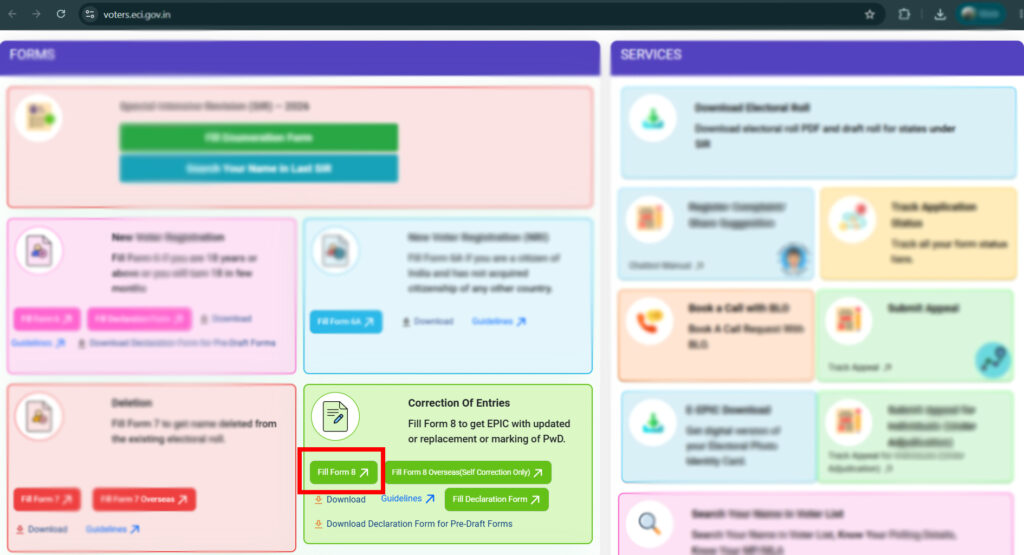
If you do not have a mobile number registered, fill Form 8 to get it done. Form 8 is an application form for shifting of residence/ correction of entries in existing electoral roll/ replacement of EPIC/marking persons with disabilities. Here are the steps to fill the form:
- Click on ‘fill Form 8‘ in the Correction of Entries box
- Login using your mobile number and OTP
- Enter your EPIC ID
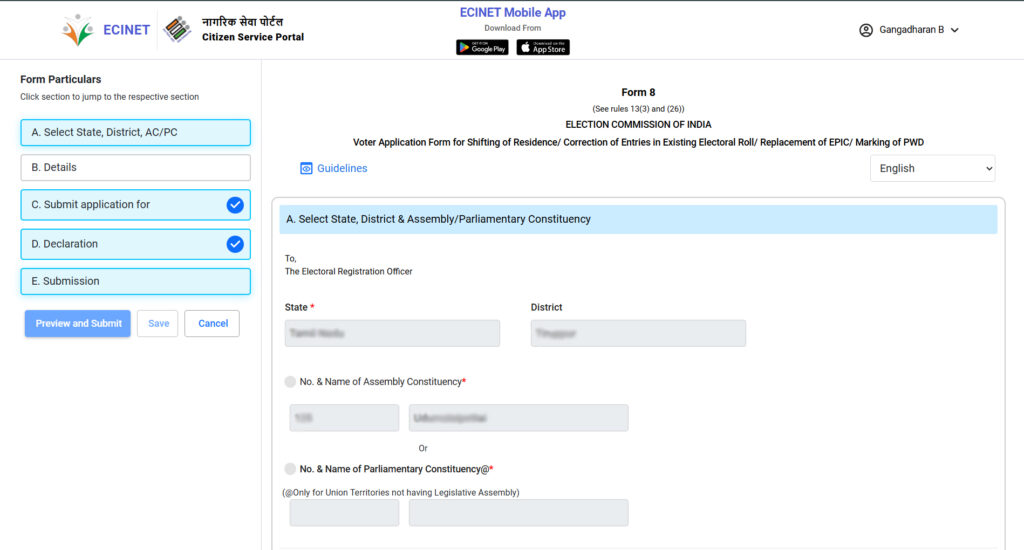
- Click on ‘Submit application for’
- Check the ‘Mobile number’ box
- Enter your mobile number
- E-sign and submit
- Save reference number for tracking
For e-signing of Form 8, it is important that the Aadhaar is linked to the mobile number and the spelling of your name is the same in your Aadhaar and Voter ID. In case of mismatches, it can be changed using the same form with Aadhaar or other IDs as proof.
Linking your phone number could be instant or could take around five to seven days. Name changes could take more than two weeks. So if you want to fill your Enumeration Form online, start these procedures immediately.
Once you have a registered mobile number with your voter ID, you can fill the Enumeration Form online by following these steps:
- Go to the ECI website
- Click on ‘Fill enumeration form’
- Enter mobile number and OTP
- Click on ‘New Enumeration Form’. You will get the pre-filled information
- Verify and enter mobile number and OTP
- Fill the rest of the form using self mapping and progeny mapping processes.
Read more: SIR explained: What every voter should know
Finding the details required to fill the enumeration form
4. Where can I find my voter details like part number, serial number, which I must fill in the SIR Enumeration Form?
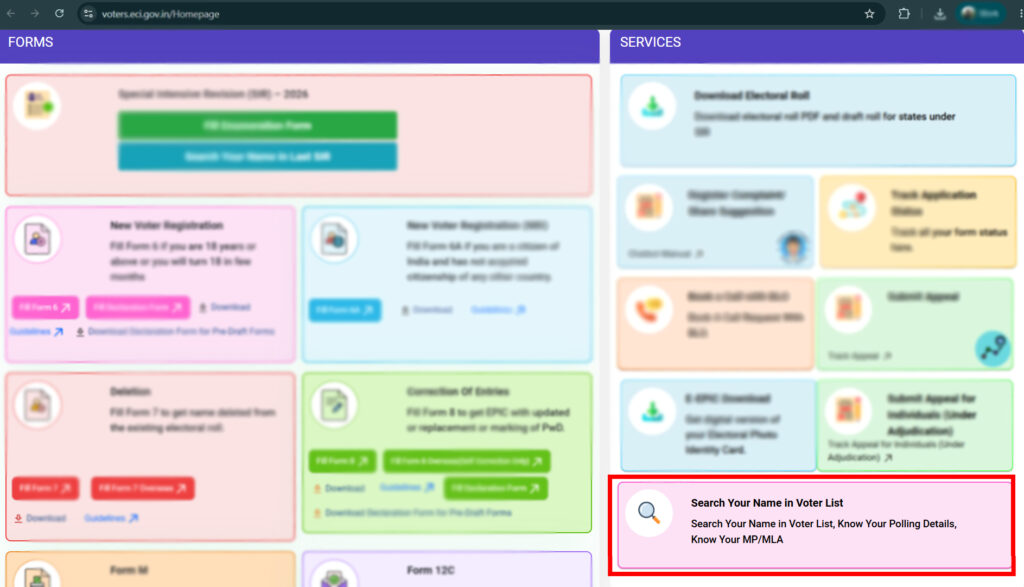
Click this link to open the Election Commission’s Citizen Service Portal. Under the services, go to ‘Search your name in Voter list’ and enter your EPIC number.
5. The EPIC number is needed to find the above details, but what if you forget your EPIC number?
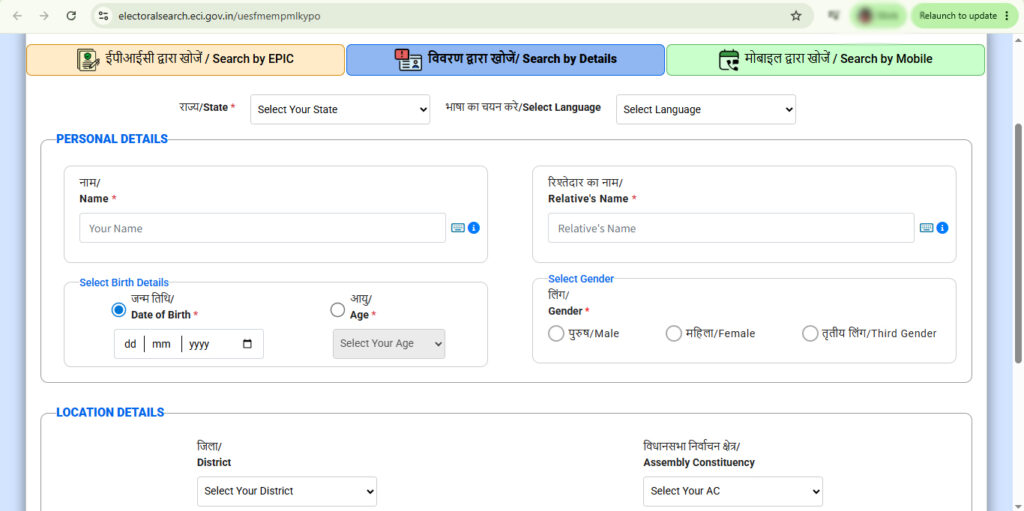
You can find your EPIC number from your voter ID or booth slip from previous elections. Even if that doesn’t work, check in the ‘Search your name in Voter list’,
- Option 1: Click on ‘Search by details’ and enter your name, state, relative’s name, date of birth, age and gender to get your details.
- Option 2: Click on ‘Search by mobile’ and enter your state and mobile number. You will receive an OTP on your mobile. And you can get your details after entering the OTP.
To contact BLO
6. I want to contact my Booth Level Officer, how do I do it?
Option 1: Election Commission Citizen Service Portal
- Open the ECI – Citizen Service Portal
- Under Services, tap Search your name in the Voter List.
- Enter your EPIC number to find your voter record (If you do not know your EPIC number follow alternative steps suggested under the previous question).
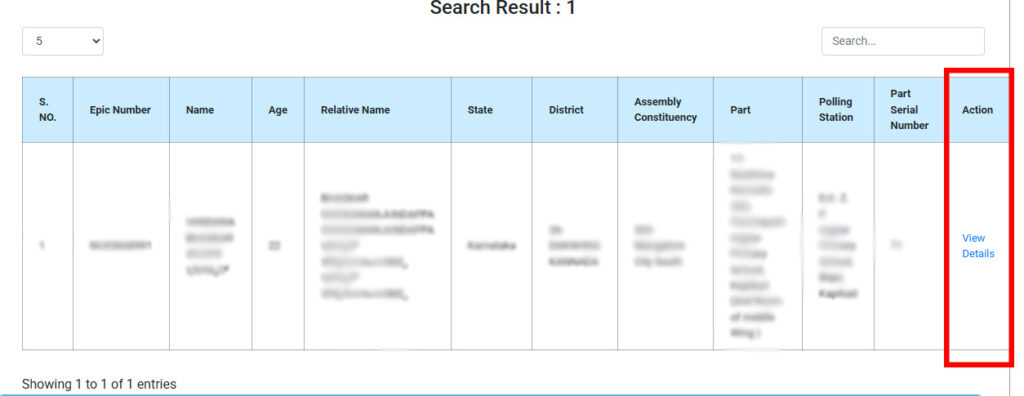
- To contact your Booth Level Officer (BLO):
- Tap View details under the Action column.
- You’ll see contact info for your BLO, Electoral Registration Officer (ERO), and District Election Officer (DEO).
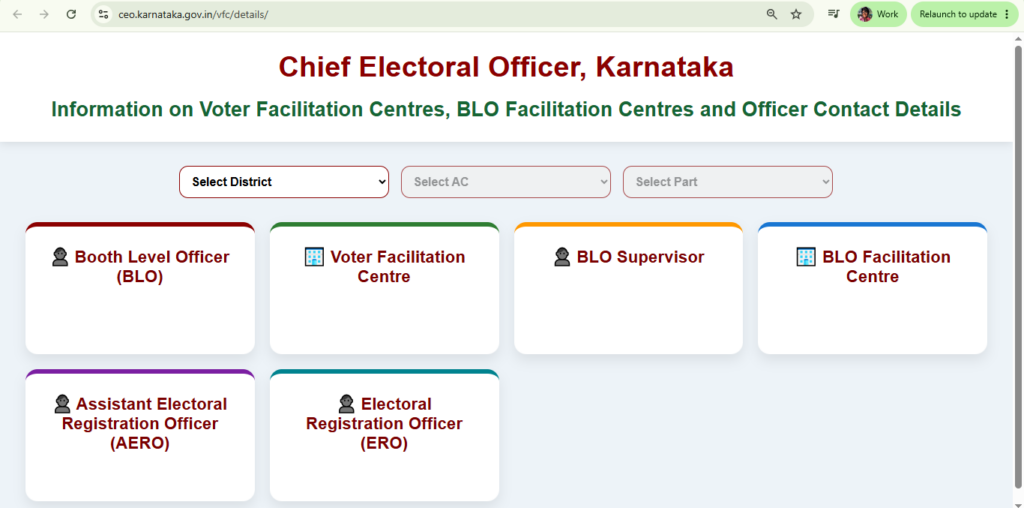
Option 2: Chief Electoral Officer (CEO) Karnataka Website
- Visit CEO Karnataka Website
- Enter:
- Your District
- Assembly Constituency
- Part
- You’ll get details for:
- BLO
- BLO Supervisor
- Assistant Electoral Registration Officer (AERO)
- Electoral Registration Officer (ERO)
- Addresses of Voter Facilitation Center and BLO Facilitation Center.
7. Where can I find my details and my relative’s details from the previous SIR that was carried out in 2002?
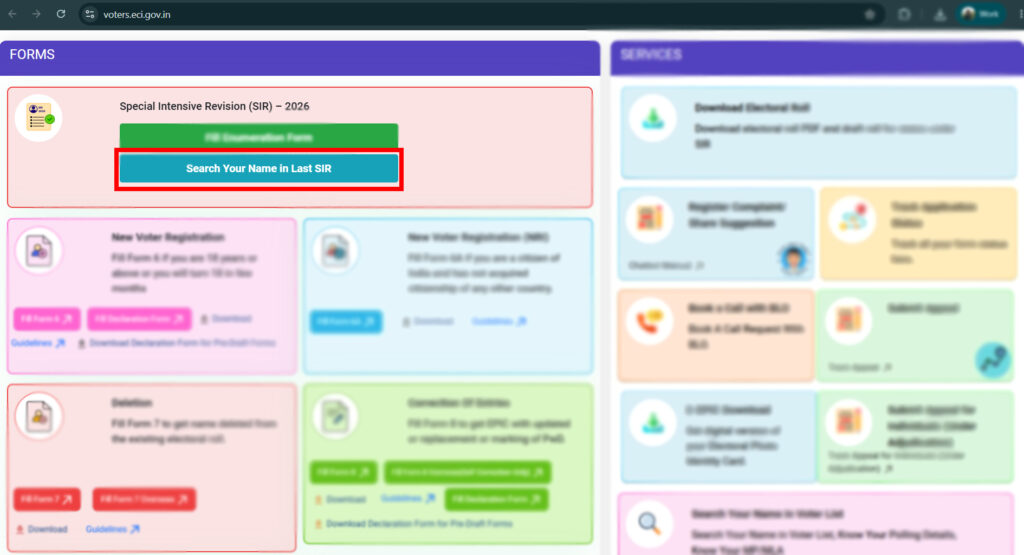
In the ECI website, click on ‘Search your name in last SIR’ and enter details such as name, state in which you voted, relative’s name, district (in 2002, not mandatory). You will find details such as your Assembly Constituency number (AC number), part number, serial number and relative’s details which are necessary to fill the Enumeration Form.
Navigating the ambiguous SIR process
To be verified as an eligible voter in the SIR process, citizens must link their details from the 2025 electoral roll to the 2002 roll. The election commission is comparing these two to create an updated list of voters.
However, many voters face a challenge: finding theirs or their relative’s details from 23 years ago. It is especially difficult for those who cannot remember where they were registered in 2002, those who moved without changing their address, and those who cannot find family details in the 2002 list.
The process faced legal and social hurdles, and many groups have been impacted because of the confusion regarding historical records including transgender persons who are estranged from their families.
Meanwhile, the Chief Minister of Karnataka has also stated that those who fail to be included in the electoral roll may risk losing government benefits. However, the commission continues the process and the door-to-door has already begun (June 30).
Read more: Confusing forms, tight deadlines: Inside the flawed SIR process
Some critical questions
Here are answers to critical questions regarding finding details of relatives.
8. I am not able to find my details or my relatives’ details in the 2002 database. Should I still fill the Enumeration Form?
In this case, you can still fill the Enumeration Form using details of any maternal or paternal relative (such as your parent’s sibling) who is verified on the 2002 list. This helps in the progeny mapping. Your relatives can be from any part of the country.
At this point, you do not have to submit any supporting documents, unless a notice is given post enumeration.*
9. What if I do not find details of any relatives in 2002 SIR?
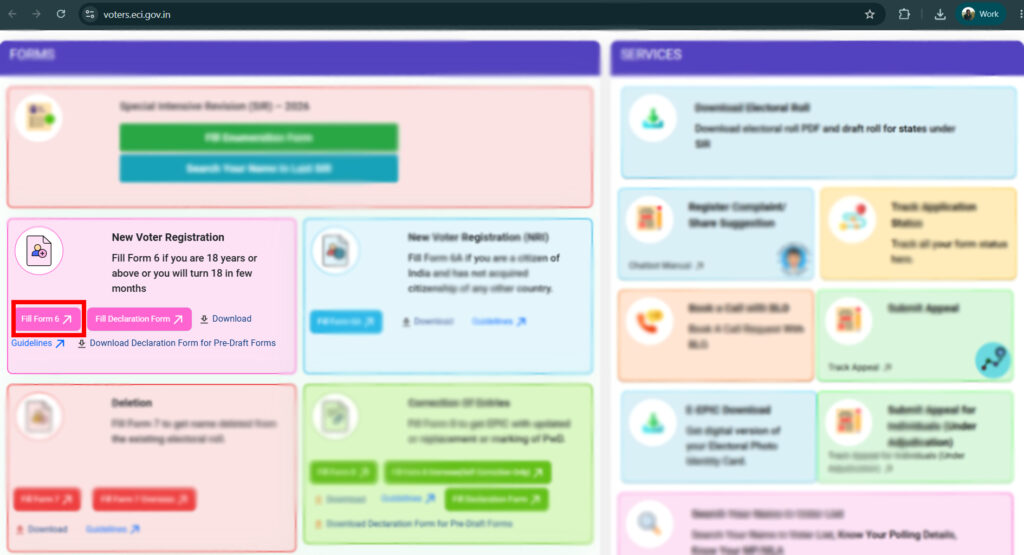
Then, you will be considered as a new voter. You will still have to submit the Enumeration Form (by only filling section 1), after which the ECI will issue a notice. In the ‘claims and objections’ window (August 5th – September 4th), you should fill the Form 6, and submit it along with a compulsory declaration and supporting documents as prescribed by the ECI.
10. Will I receive an acknowledgement after submission of Enumeration Form?
Yes, if you submit the form online, you will receive an acknowledgement that you have successfully submitted the Enumeration Form. You can download the acknowledgement as an image.
If you submit the form to your BLO, they will take one copy of the Enumeration Form and give an acknowledgment of receipt of the form on the other copy of the Enumeration Form, which you should retain.
11. I am a first-time voter (turned 18 in 2026) and have applied for a voter ID before the voter registration closed. Will I be given an Enumeration Form?
No, you will not receive an Enumeration Form as SIR is being conducted for those who were enrolled in the 2025 electoral roll. Information about this is currently scarce and you may have to wait for the ‘claims and objections’ window to file a Form 6 for the addition of a new voter.
*Addendum: According to ECI officials in Karnataka, you can only map to your parents and grandparents. As confusions persist, please check with your BLOs before doing the progeny mapping.
[If you have more questions, please comment below and we will try our best to get them answered. Note: Do not share any personal information.]
For more clarifications on SIR, head to Part 2 of the series.
Do you want to get information on local events in Bengaluru, Mumbai and Chennai, news updates, links to explainers, data and more? Join our WhatsApp broadcast channel, Citizen Matters – Civic updates for the Active Citizen.
Hats off to the authors for bringing out such a detailed and informative article on a process every citizen should undergo. The authors have done a meticulous research on the nuances of the exercise and explained the process in a lucid manner. My heartfelt compliments to them.
Agreed, thanks for the detailed explanation. However, still unclear- i dont have data for section 1 as i cd not find my name in 2002 SIR. But i have my father’s details. Whose name in the first row should be written- mine or father’s?
Sir, My name is not there in 2002 list. My father had expired by then. I am able to link with my mother’s name on 2002 list. However I am not able to fill relatives name in next coloumn. what is the solution?
I donot find my name in 2002 SIR voter list.My father and mother died in 1994 and 2000 respectively.
How can I do progeny mapping.I have voter id cards issued in 1994 and 2017 and I have voted too on coiple of occasions. I am a senior citizen(70yrs)
what shoukd I do now?
Sir, You might have got your Enumeration form. You just put your details with EPIC number. Your name will appear in Draft list but you will receive notice to provide documents After notice your documents will be verified by Authority and your name will be included in Final list.
sir if there has been spelling mistake in any writing while fillling can we erase and rewrite in numeration form
My mother has already expired 4 years back . And my mother name is in the SIR 2002 . In the section where my date of birth is to be written and father name and epic no , mother name and epic no is to be written. should i leave blank where my mother name and epic no is supposed to be written.
No, you have to enter your mother’s details even if she is no more.
Also, you have to give her details in the Elector’s relative box with Assembly constituency details, Polling station number (Part number) and Serial number from the 2002 voter list.
excellent work by writer of this article, very helpful.
we not found my name in 2002 sir i have voter ID card in 1995 No how can i fill detail the SIR
https://voters.eci.gov.in/searchInSIR/S2UA4DPDF-JK4QWODSE
Search your name in this link by entering your state district and name matching by your father name and Polling Station No
https://voters.eci.gov.in/searchInSIR/S2UA4DPDF-JK4QWODSE
Search your Father name, your grand father name, grand mother name in this link by entering your state district and matching by his father name/husband name and Polling Station No
How do I get another SIR form as both the copies are wrongly entered and Aadhar is not linked with mobile no
Inform your BLO he will get it in 5 to 10 days
ನನಗೆ 2002 ರ ಮತದಾರರ ಪಟ್ಟಿಯಲ್ಲಿ ನನ್ನ ಹೆಸರು ಇರುವುದಿಲ್ಲ, ಈಗಿನ 2025 ರ ಪಟ್ಟಿಯಲ್ಲಿ ಹೆಸರು ಇರುತ್ತದೆ, ಈಗ ನನಗೆ ವಯಸ್ಸು 64 ವರ್ಷಗಳು ತುಂಬಿದ್ದು ಕರ್ನಾಟಕ ಸರಕಾರಿ ಸೇವೆಯಲ್ಲಿದ್ದು ನಿವೃತ್ತನಾಗಿರುತ್ತೇನೆ, ನಾನು SIR Form ನ್ನು ಭರ್ತಿ ಮಾಡಲು ಸಲಹೆ ಮತ್ತು ಸೂಚನೆಗಳನ್ನು ನೀಡಬೇಕಾಗಿ ವಿನಂತಿಸುತ್ತೇನೆ,( 2002 ರ ಮತದಾರರ ಪಟ್ಟಿಯಲ್ಲಿ ನನ್ನ ಪೋಷಕರ ಮಾಹಿತಿ ಲಭ್ಯ ಇರುತ್ತದೆ)
Thanks a lot. Written in detail and unambiguous.
Excellent work aby the authors!
1. I have a scenario of my cousin who is to work in bangalore and his voters id address is bangalore. Now he has shifted to mangalore .
His phone number is not linked to Voter ID hence he is not able to file online. So i am sure many private employees have this issue. is there any way to close the SIR loop for these kind of citizens.
after submitting the SIR form in online I have not got the reference number how can I get it
What if the name in SIR 2002 doesn’t match with the present name due to typographical and spelling mistakes made by the enumerators in 1995?
I have the same query
I have the same issue as my name in 2002 is incorrect or say half name.
If I fill SIR with incorrect name, what documents do I need to submit for proof? or simply I skip my details from 2002 and link to my parents in Section B of SIR? can someone please answer.
What if the name in SIR 2002 doesn’t match with the present name due to typographical and spelling mistakes made by the enumerators in 1995?
What if the name in SIR 2002 doesn’t match with the present name due to typographical and spelling mistakes made by the enumerators in 1995?
Thanks a lot for this very thorough and helpful explainer.
Unfortunately, my particular problem doesn’t seem to be addressed. I need to find the Part Number of our polling booth in the 2002 voters list in order to check for our names in the list (as required by the ongoing SIR process).
None of our neighbours seem to know it, including people listed in the BLO list for the area as political party volunteers.
Our constituency changed after 2002 (in 2008, I think). This further complicates the situation. Our polling booth is the same but the Part Number seems to have changed.
One really shouldn’t have to jump through hoops to continue being a voter after being in voters lists all these years – well over 2 decades at the same address in our case!!!
MY MOTHER NAME I COULD Find the any deatis in last SIR 2002 BUT she is voting from past 50years what to do now how we can fill the SIR form which option to fill in this case even i cant also fill the form without deatils of my mother who is resposiable for this where its gone of 50years record???
File Form 8 on the ECI portal and link his mobile number to the Voter ID.
Then, after approval you can file the Enumeration form online.
Can the name correction and SIR be done hand in hand or do I have to wait for name correction( which says needs 2 weeks for correction) befor proceeding for SIR 2026.
My mother has shifted from other state to Karnataka and holds the EPIC for karnataka. Should I link my mother’s reference from 2002 (other state) or should I link from current EPIC number (Karnataka state)?
Sir/Madam, if my name came in Anomaly list, then can i fill enumeration form for both self mapping column and progeny mapping column?? Please Answer, Thank you.
In the Section 2 “relationship to you” is wrong. As per the ECI guidelines we need to fill the 2002 Elector information as is.
Example: If I am giving my Grand parent Details in the Progeny mapping. Then the 2002 list contain the my “Grand Father name” and their “Father’s name”. So we have to fill
Name : Grand Father Name
EPIC number (if available) : EPIC number if available
Relative Name : Great grand father name
relationship to you : Father
district : Distinct name as per 2002
state : State name as per 2002
Assembly Constituency (AC) : Constituency as 2002
number, part number, and serial number: All these are as per 2002 list
It means we have to fill Section 1 or 2 per the 2002 list only.
### Clarification on Section 2 – “Relationship”
The “Relationship” field in **Section 2** should **not** indicate the applicant’s relationship with the 2002 elector.
As per the ECI guidelines, the details in **Section 1 or Section 2** must be entered **exactly as they appear in the 2002 Electoral Roll**.
For example, if I am providing my **grandfather’s details** for progeny mapping:
* **Name:** Grandfather’s name (as per the 2002 Electoral Roll)
* **EPIC Number (if available):** Grandfather’s EPIC number
* **Relative Name:** Great-grandfather’s name (as recorded in the 2002 Electoral Roll)
* **Relationship:** Father (because the 2002 roll records my grandfather as the son of his father)
* **District:** As recorded in the 2002 Electoral Roll
* **State:** As recorded in the 2002 Electoral Roll
* **Assembly Constituency (AC):** As recorded in the 2002 Electoral Roll
* **Part Number, Serial Number, and House Number:** As recorded in the 2002 Electoral Roll
Therefore, **Section 1 and Section 2 should be reproduced exactly from the 2002 Electoral Roll without modifying any of the elector’s details based on the applicant’s relationship.**
Are you sure about it? Shouldn’t I mention my relationship with my grandfather?
Excellent effort by Karnataka authorities. Very informative and user friendly software. We have filled our form online, submitted and downloaded the acknowledgment.
If online enumeration is Completed, is it still necessary to Fill up physical enumeration form?
If I filled the Enumeration Form online, do I have to give the physical from to BLO?
Sir, My parents names are present in 2002 voters list. My family and I have made avoters card in 2005 after which we have shifted many places. We were not able to vote and now when we enter our epic ..it says not found . We now live on our farm in Srirangapatna. our names are not on the 2026 list. How do we proceed. Can we fill form 6 or form 8 ? Is there anyway to fill enumeration form online ? please help.
My name is present in 2002 voter list at Honnavara as well as 2026 voter list at Shivamogga. in such cases how to fill SIR form.
i need your help in understanding that in 2002 i have voted in another city and i have all the details… now my voter list and i do voting in another city…
so now in part 1 of SIR i have to fill the old voting details ??and if yes then new city voting details must be written in which part??
in 2002 my wife’s name was entered as S.Nalini and she had a voter card given. In 2018 after Aadhar name was corrected as Nalini Subbaraman and new EPIC card was issued.
How to link these as her parents do not have any epic cards and parents are very old now.
Sir I submitted ECI Remuneration form online at voter’s service portal, received acknowledgement message as your name mismatch in aadhar and epic, applied for update in form no.8 as name in epic as per aadhar, received reference ID, what further steps should I follow
Very good article which explains steps clearly on the Enumeration process. I would like a specific question to be answered. I got my voters id in Karnataka in 2024 and have voted once in the same year. Should I be filling the SIR form?
sir my parents name is not there In 2002 list but they were alive at that time and I was 14yrs but my maternal grandmother name is there in 2002 list can I put her name
my election id is not showing in the SIR app.What is the next steps should i do now.. i voted every year and in 2023 too.
When filling enumeration form i had linked mobile number but then I saw my name misspelled. so i filled form 8 which is in submitted status form 3 weeks. I am not able to proceed and it says mobile not link to fill enumeration. I can login with the mobile number when 2 OTP it says mobile not linked
My wife and I (67 & 73 respectively) are from West Bengal but have been living permanently in Bengaluru since 2011 in our own apartment here and our Aadhars and passports bear our Bengaluru address. In 2002 I was posted abroad in State Bank of India’s New York office and so our names don’t figure in the 2002 SIR list anywhere. Nor do our parents’ who had passed away before 2002. We have submitted our SIR enumeration forms now but are worried about the process of scrutiny. Please guide us about what documents may be required for providing to the ECI at the verification stage. Between 2006 and 2009 I was General Manager with State Bank of Mysore here in Bengaluru. Thank you for your help!
My wife and I (67 & 73 respectively) are from West Bengal but have been living permanently in Bengaluru since 2011 in our own apartment here and our Aadhars and passports bear our Bengaluru address. In 2002 I was posted abroad in State Bank of India’s New York office and so our names don’t figure in the 2002 SIR list anywhere. Nor do our parents’ who had passed away before 2002. We have submitted our SIR enumeration forms now but are worried about the process of scrutiny. Please guide us about what documents may be required for providing to the ECI at the verification stage. Between 2006 and 2009 I was General Manager with State Bank of Mysore here in Bengaluru. Thank you for your help!
It is sad that there are no English instructions or details in the form. This makes people like me dependent on others or tech (which can be incorrect on many occasions). I therefore, did this online. But i wonder if doing this online has any disadvantages? would you know this?
Please explain filling Section 2 or Section 3 which is the most confusing part
Dear Sir/ Madam. I Ajit V D Resident of Belgavi district Karnataka but at present my whole family is residing in the maharashtra since 15 years. no one stays in my home it is given for rent in karnataka. please suggest what i am supposed to do
As per 2002 voter list my name shows “ABCD” (second name) but in 2026 my full name is ” WXYZ ABCD” (1st & 2nd name), my parents name is shown correctly in 2002 list, can you advise how do I need to fill in part A? as my name is shown incorrectly or I say half name in 2002.
I am thinking it I can skip part A on SIR and link myself with my parents in Part B.
kindly advise which process is correct.
I was putting my voter id on Enumeration form it appear data not found, then I was submitted form 6 for Voter ID, one month above still it is not forwarded to BLO, what to do , the last date of SIR in Telangana is 24 July 2026.
please advise